


A plain-English guide to picking a local model for coding, writing, and AI agents - no PhD required
Last updated: June 2026
TL;DR: Jump to the bottom of the page if you want to skip the reading and go straight to my interactive AI model finder tool.
You don't need a data center or a monthly subscription to run a genuinely capable AI on your own machine anymore. A normal gaming PC can now run models that, two years ago, would have required cloud servers costing A LOT to run. Everything stays on your computer: your code, your writing, your weird 2 a.m. questions...
The catch is that "which model should I run?" has become a genuinely confusing question. There are dozens of models, each in a dozen sizes, each in a dozen compression levels, with names like Qwen3-Coder-30B-A3B-Instruct-Q4_K_M. This guide cuts through all of it. By the end you'll know exactly what to download for your graphics card and your specific task - whether that's writing code, drafting a blog post, or running an AI agent like OpenClaw or Hermes.
We'll start with a plain-English crash course (skip it if you already know your VRAM from your KV cache), then get to the actual recommendations.
Part 1: What all the jargon actually means
The single most important number: vRAM
Your graphics card has its own dedicated memory, called vRAM (video RAM). This - not your processor, not your regular RAM - is the thing that decides which AI models you can run and how fast.
Think of vRAM as the size of your desk. The AI model is a stack of books you need open in front of you to work. If the stack fits on the desk, everything is fast and smooth. If it doesn't fit, you have to keep some books on a shelf across the room and walk over every time you need them. That "walking across the room" is the single biggest reason local AI feels slow, and we'll come back to it.
Common vRAM amounts:
- 8 GB - older or budget cards (Nvidia GTX 1070, RTX 3060 8GB; AMD RX 6600, RX 7600; many laptops)
- 12 GB - mid-range (Nvidia RTX 3060 12GB, RTX 4070; AMD RX 6700 XT, RX 7700 XT)
- 16 GB - upper mid-range (Nvidia RTX 4060 Ti 16GB, RTX 4080; AMD RX 6800/6900 XT, RX 7800 XT, RX 9070 XT)
- 24 GB - enthusiast (Nvidia RTX 3090, RTX 4090, RTX 5090-class; AMD RX 7900 XTX, Radeon Pro W7800)
- Apple Silicon Macs are a special case - they share one big pool of memory between the chip and the graphics, so a 32GB or 64GB Mac can punch well above a similarly-priced PC. The trade-off is slower raw speed.
A note for AMD owners: the models are identical, but the software path differs slightly. AMD cards run through ROCm (on Linux, and increasingly on Windows) or Vulkan, and both Ollama and LM Studio support them - LM Studio ships a ROCm build. One small gotcha: the newer "I-quants" (file names starting with IQ) don't play nicely with the Vulkan backend, so on AMD prefer the standard "K-quants" (Q4_K_M, Q5_K_M, etc.) unless you're confirmed to be running ROCm.
To check yours on Windows: open Task Manager → Performance → GPU, and look at "Dedicated GPU memory".
"Parameters" and what "30B" means
When you see a model called 8B, 27B, or 30B, the B stands for billion parameters. Parameters are the model's learned knowledge - think of them as the number of tiny dials inside the model that were tuned during training. More parameters generally mean a smarter, more capable model.
But more parameters also mean a bigger stack of books on your desk. A 30-billion-parameter model is roughly four times the size of an 8-billion one. The whole game is finding the smartest model that still fits your vRAM.
Quantization: the magic that makes this all possible
Here's the trick that lets a normal PC run these things at all: quantization.
In its original form, every one of those billions of parameters is stored at high precision - a long, exact number. Quantization rounds those numbers down to shorter, less precise versions. It's almost exactly like saving a photo as a JPEG: you throw away some detail to make the file dramatically smaller, and most of the time you can't even tell the difference.
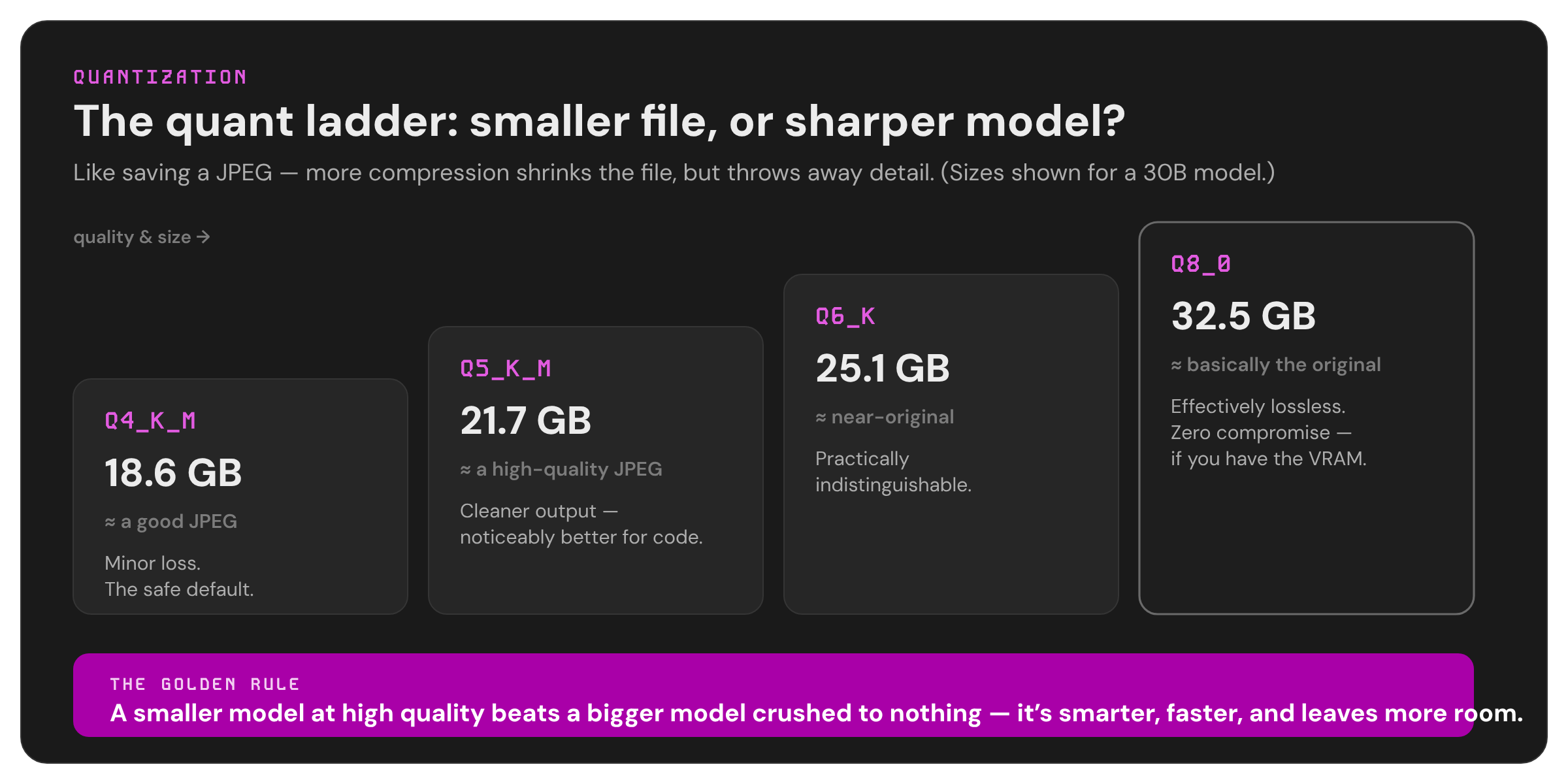
You'll see quantization written as Q4, Q5, Q6, Q8, with a _K_M or _K_S tacked on (those just mean "medium" or "small" variants of the same method). Higher number = less compression = better quality but bigger file. Here's the honest breakdown:
| Quant | What it's like | Quality | Use it when |
|---|---|---|---|
| Q4_K_M | A good JPEG | Minor quality loss, totally usable | The default. Best fit-vs-quality balance, and what most one-click downloads give you |
| Q5_K_M | A high-quality JPEG | Noticeably cleaner, especially for code | You have a little VRAM to spare |
| Q6_K | Near-original | Practically indistinguishable from full quality | You have comfortable headroom |
| Q8_0 | Basically the original | Effectively lossless | You have lots of VRAM and want zero compromise |
The golden rule: it is always better to run a smaller model at good quality than a bigger model crushed down to nothing. A 12B model at Q6 will beat a 30B model squeezed into Q2 - it'll be smarter and faster and leave you more room. Don't chase the biggest number; chase the best fit.
For coding specifically, lean toward Q5 or higher if you can - code is unforgiving, and small rounding errors show up as bugs more than they do in casual chat.
Loading the model vs. leaving room for context - the part everyone forgets
This is the mistake that trips up almost every beginner, so read this twice.
The model's file size (the numbers in that table above) is just the cost of loading it - getting the books onto the desk. But you also need free space for the actual conversation: everything you type, everything the model has said, every file it's reading. This working memory is called the context window, and the space it occupies in vRAM is called the KV cache.
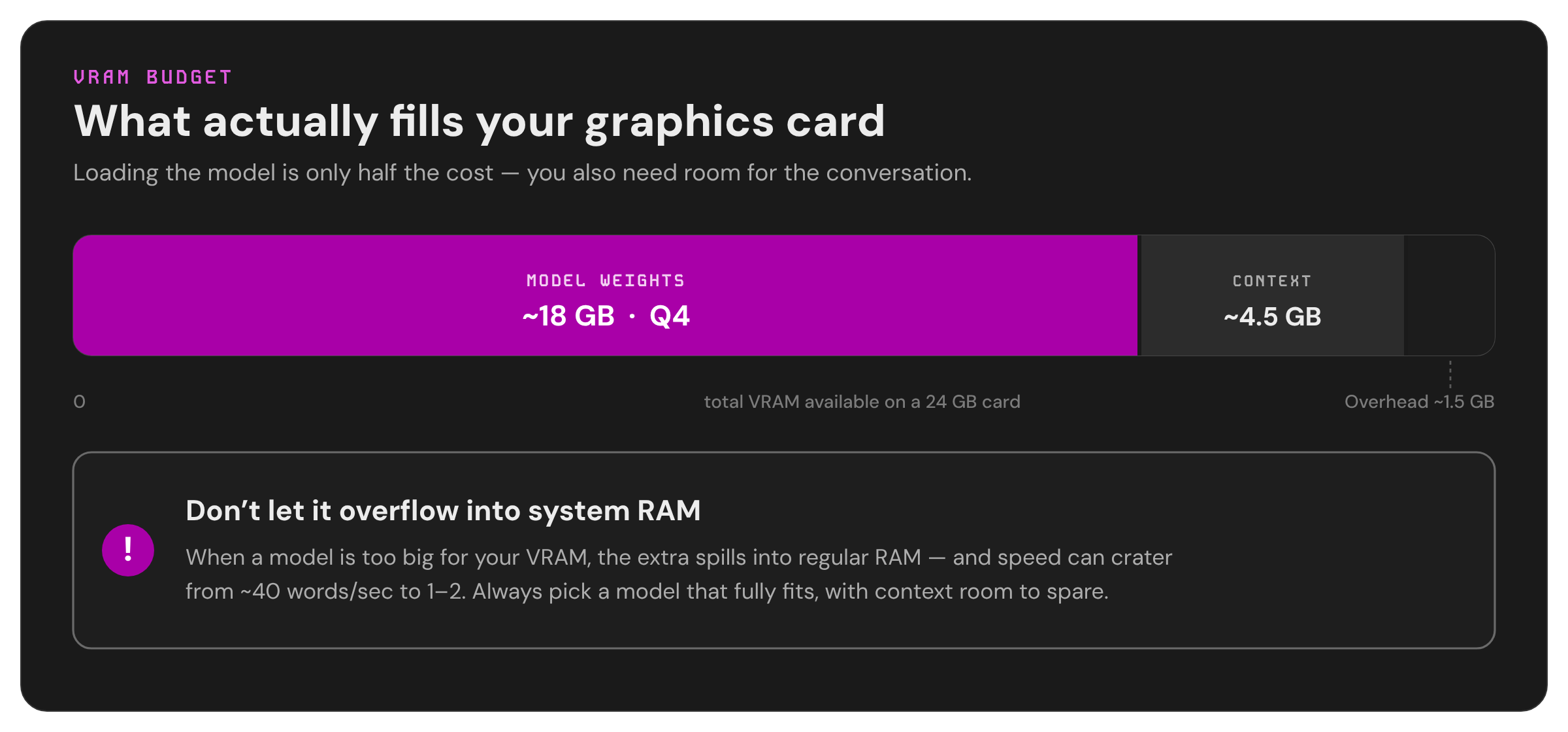
The longer the conversation or the bigger the document you feed it, the more vRAM the context eats - on top of the model. And it adds up fast. A model that fits perfectly in your vRAM with a short prompt can suddenly overflow when you paste in a long file.
So when you're budgeting vRAM, the math is:
Model file size + room for context = total vRAM needed
A practical example on a 24GB card: a model that loads at ~18GB leaves you about 4-5GB for context, which is plenty for normal back-and-forth (roughly 32,000 words of memory) but not enough for stuffing an entire codebase into a single prompt. If you need huge context, you need a smaller model or more vRAM.
What happens when it doesn't fit: "offloading to RAM" (and why it's painful)
If a model is too big for your vRAM, the software won't necessarily refuse - it'll quietly put the overflow into your regular system RAM instead. This is called offloading, and it's the "walking across the room for books on the shelf" problem from earlier.
Your regular RAM is vastly slower for this job than vRAM. A model that runs at a brisk 40 words per second fully on the GPU can crater to 1-2 words per second the moment it spills into RAM - slow enough that you'll be staring at the screen waiting for each word. In the worst cases (loading something way too big), it drops to the point where a single greeting takes minutes.
The takeaway: always pick a model that fully fits in your vRAM with context room to spare. Offloading is a last resort, not a plan. The only exception is Apple Silicon, where the shared memory pool makes the penalty much gentler.
Dense vs. MoE (or: why a "30B" model can run as fast as an 8B one)
You'll see some models labeled with a second number, like 30B-A3B or 35B-A3B. The "A3B" means "Active 3B." These are Mixture-of-Experts (MoE) models, and they're a clever cheat.
A normal ("dense") model uses all of its parameters for every single word it generates. An MoE model is more like a company with many specialists - it only wakes up the relevant 3 billion parameters for each word, leaving the rest dormant. The result: it takes up the disk and vRAM space of a big model, but runs at the speed of a small one.
For most people on consumer hardware, MoE models like Qwen3-Coder-30B-A3B are the sweet spot in 2026 - big-model smarts at small-model speeds. The only quirk is they still need the full vRAM to load (all the experts have to be in the room, even the sleeping ones).
GGUF, Unsloth, bartowski - who makes these files?
The compressed model files you download come in a format called GGUF, which is just the universal file type that local AI tools understand - like MP3 for music. Any tool on this list (Ollama, LM Studio, and others) can play a GGUF.
But someone has to do the compressing, and a few community heroes have become the trusted names:
- Unsloth - makers of "Dynamic" quants (you'll see
UD-Q4_K_XLand similar). Their secret sauce is being smarter about which parts of the model to compress hard and which to protect, giving you better quality at the same file size. Generally the recommended starting point. - bartowski - a prolific, reliable quantizer who publishes the full ladder (Q3 through Q8) for almost every model, with clear size listings.
- lmstudio-community - the official curated quants inside LM Studio.
When in doubt, grab the Unsloth or bartowski version of whatever model you want.
"Uncensored," abliteration, and Heretic - what these actually do
Most models ship with safety guardrails that make them refuse certain requests. The community has tools to remove those refusals, and you'll see the results labeled "uncensored," "abliterated," or "Heretic."
A quick terminology note, since it's commonly misspelled: the technique is abliteration, not "obliteration." It's a blend of "ablate" - to surgically remove - and "obliterate." It works by identifying the specific internal direction the model uses to say "no" and neutralizing it, without retraining the whole model. "Heretic" is just a popular automated tool that does this, mostly used on Google's Gemma models.
Two things worth understanding:
- It's near-lossless when done well. A good abliteration removes the refusals while keeping the model's intelligence almost completely intact - the best ones score essentially zero refusals with no measurable drop in capability.
- It removes the reflex to refuse, not the model's underlying judgment. The model still has its training-shaped instincts. These builds shine for legitimate edge cases the base model is annoyingly squeamish about: security research, fiction involving violence, medical questions, legal grey areas, and adult creative writing. You're responsible for what you do with them, and for following your local laws.
Ollama vs. LM Studio - which app do I use?
These are the two most popular ways to actually run the models. They use the same engines under the hood, so model quality is identical - it's purely about how you like to work:
- LM Studio - a polished desktop app with a real graphical interface. You browse and download models with buttons, chat in a clean window, and it even has an "UNCENSORED" filter tab for finding abliterated models. Best for beginners and anyone who'd rather not touch a command line.
- Ollama - a command-line tool. You type
ollama run qwen3-coder:30band it just works. More scriptable, lighter weight, and the standard backend that most AI agents plug into. Best for tinkerers and anyone planning to run agents.
Many people (myself included) install both: LM Studio for hands-on chatting and Ollama for powering agents in the background.
What's an "agent"?
A regular chat model answers questions. An agent is a model hooked up to tools - it can read and write files, run commands, browse the web, and chain many steps together to actually do a task instead of just describing it. "Refactor this whole project" or "research X and write me a summary file" is agent territory.
Tools like OpenClaw, Hermes, Cline, OpenCode, and Aider are the "scaffolding" that wraps a model and gives it those hands. They mostly connect to Ollama running in the background. The important thing for model choice: agents demand strong tool-calling ability (the model has to reliably output structured commands) and they burn through context fast (every tool result gets added to the conversation). So for agents, prioritize models explicitly built for it - and leave extra context headroom.
Part 2: Which model should you actually run?
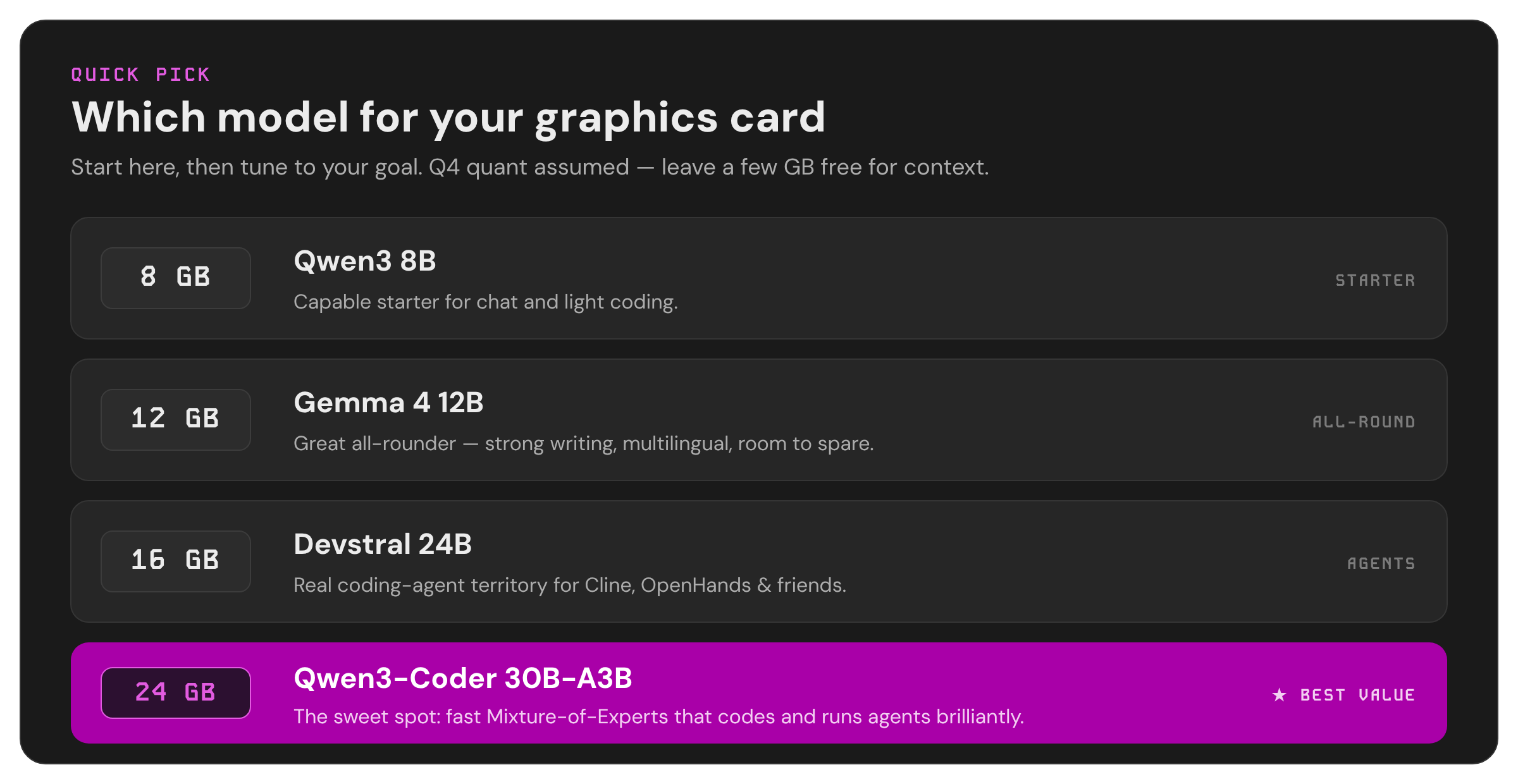
Now the payoff. Find your graphics card's vRAM below, then pick based on what you want to do. All sizes assume the Q4_K_M quant unless noted - the safe default. Model names are given for both Ollama (the command) and LM Studio (search this in the Discover tab).
If you have 8 GB of VRAM
This is the entry tier. You're limited to smaller models, and you'll want to keep contexts modest, but it absolutely works.
| Goal | Model | Ollama command | LM Studio search |
|---|---|---|---|
| Coding | Qwen3 8B | ollama run qwen3:8b | Qwen3-8B-GGUF |
| Writing / general | Gemma 4 12B (Q4, tight) | ollama run gemma4:12b | gemma-4-12b-it |
| Agents (tool use) | Gemma 4 E4B | ollama run gemma4:e4b | gemma-4-e4b |
| Uncensored | Llama 3.1 8B abliterated | ollama run mannix/llama3.1-8b-abliterated:q5_K_M | Meta-Llama-3.1-8B-Instruct-abliterated |
Reality check: Gemma 4 12B at Q4 (~7.6GB) is right at the edge - fine for short chats, but you'll have little context room. If it struggles, drop to an 8B model.
If you have 12 GB of VRAM
A real step up. You can now run capable mid-size models comfortably.
| Goal | Model | Ollama command | LM Studio search |
|---|---|---|---|
| Coding | DeepSeek-Coder-V2 Lite 16B | search Discover | DeepSeek-Coder-V2-Lite-Instruct-GGUF |
| Writing / general | Gemma 4 12B | ollama run gemma4:12b | gemma-4-12b-it |
| Agents | Qwen3 14B abliterated (:agent tag) | ollama run richardyoung/qwen3-14b-abliterated:agent | qwen3-14b-abliterated |
| Uncensored | Gemma 4 12B Heretic | ollama run igorls/gemma-4-12B-it-heretic-GGUF | gemma-4-12B-it-heretic-GGUF |
Gemma 4 12B is the workhorse here - strong at writing, multilingual, and you can even run it at Q5 or Q6 for extra polish with vRAM to spare.
If you have 16 GB of VRAM
You're now into "this is genuinely good" territory and can touch the 24B class.
| Goal | Model | Ollama command | LM Studio search |
|---|---|---|---|
| Coding / agents | Devstral (orig 24B) | ollama run devstral:24b | Devstral-Small-GGUF |
| Writing / general | Gemma 4 12B (at Q6 for quality) | ollama run gemma4:12b | gemma-4-12b-it (Q6_K) |
| Uncensored | Gemma 4 12B Heretic (Q5/Q6) | ollama run igorls/gemma-4-12B-it-heretic-GGUF | gemma-4-12B-it-heretic-GGUF |
The 24B coding models fit but leave thin context headroom at 16GB - workable, but you'll feel the squeeze on long sessions.
If you have 24 GB of VRAM - the sweet spot ⭐
This is the target most enthusiasts aim for, and for good reason: it's where the best consumer models live with real context room. This is where you should be if you're serious about local AI.
| Goal | Model | Ollama command | LM Studio search |
|---|---|---|---|
| Coding & agents (best all-round) | Qwen3-Coder 30B-A3B | ollama run qwen3-coder:30b | Qwen3-Coder-30B-A3B-Instruct-GGUF |
| Coding (top quality) | Qwen3.6 27B | ollama run qwen3.6:27b | Qwen3.6-27B-GGUF (Unsloth UD-Q4_K_XL) |
| Speed-first agents | Qwen3.6 35B-A3B | ollama run qwen3.6:35b | Qwen3.6-35B-A3B-GGUF |
| Dedicated coding-agent scaffolds | Devstral Small 2 | ollama run devstral-small-2:24b | Devstral-Small-2-GGUF |
| Writing & reasoning | Gemma 4 31B | ollama run gemma4:31b | gemma-4-31B-it-GGUF |
| Uncensored (best) | Qwen3.6 35B-A3B Uncensored | ollama run fredrezones55/Qwen3.6-35B-A3B-Uncensored-HauhauCS-Aggressive | same name |
| Uncensored writing | Gemma 4 31B Heretic | search Discover | gemma-4-31B-it-heretic-Gguf |
The one-line recommendation for most people on 24GB: start with Qwen3-Coder 30B-A3B at Q4. It's a Mixture-of-Experts model, so it loads in ~18GB but runs fast, it's excellent at both coding and agentic tool use, it leaves enough room for a comfortable 32K context, and its license (Apache 2.0) means you can use it for anything. If you mostly write prose, swap to Gemma 4 31B instead - it has the best feel for natural language.
PS. If you are planning to buy a GPU for LLM work specifically, I highly suggest AMD RX 7900 XTX. It's a lot cheaper than Nvidia, less power hungry, and relatively "small" - making it much easier to build. If you are planning to use it for image/video generation, then stick to Nvidia - sadly, all libraries out there are built using the CUDA library, which was created by Nvidia :]
Part 3: The full quant ladder (reference)
Download sizes in GB, weights only - remember to add room for context on top. "Fits 24GB?" assumes you want usable context, not just bare loading.
| Model | Q4_K_M | Q5_K_M | Q6_K | Q8_0 | Best home |
|---|---|---|---|---|---|
| Qwen3-Coder 30B-A3B | 18.6 | 21.7 | 25.1 | 32.5 | 24GB at Q4 |
| Qwen3.6 27B (dense) | 17 | ~19 | ~22 | ~28.5 | 24GB at Q4 |
| Qwen3.6 35B-A3B (MoE) | ~21 | ~24.5 | ~28 | ~37 | 24GB at Q4 only |
| Devstral Small 2 (24B) | 15 | ~17 | ~19.5 | 26 | 16–24GB |
| Gemma 4 31B | 18.3 | 21.7 | 25.2 | 32.6 | 24GB at Q4 |
| Gemma 4 26B-A4B (MoE) | ~16 | ~18.5 | ~21.5 | ~27.5 | 24GB |
| Gemma 4 12B | 7.6 | ~8.8 | ~10 | 13 | 12–16GB, any quant |
| Qwen3 8B | ~5.0 | ~5.7 | ~6.6 | ~8.5 | 8GB, any quant |
| Llama 3.1 8B | ~4.9 | ~5.7 | ~6.6 | ~8.5 | 8GB, any quant |
Sizes are from the published Unsloth/bartowski GGUF repos where available, and computed from standard compression ratios otherwise (accurate to about ±0.5GB). Builders vary slightly - treat these as planning numbers.
Part 4: A simple decision flow
- Check your vRAM. That dictates your tier - don't fight it. You will only waste time with zero benefit.
- Pick your main goal: code, write, or run agents.
- Default to the Q4_K_M version of the recommended model for your tier and goal.
- Leave context room. Aim for a model file that's at least ~3-4GB smaller than your vRAM.
- If quality matters more than context (and you have headroom), step up one quant level.
- If you keep hitting "out of memory" or it crawls, you're offloading to RAM - drop to a smaller model or lower quant. Don't tolerate the slowdown.
- For agents, prefer models built for tool use (Qwen3-Coder, Devstral, the
:agent-tagged abliterated builds) and budget extra context.
A note on how fast this moves
The single most important thing to know is that this entire field reshuffles every few weeks. New models, new versions, and better quants drop constantly, and version numbers multiply (Qwen 3.5 vs 3.6, Gemma 4's many variants, and so on can all coexist at once). Everything here is accurate as of mid-2026, but before you commit, spend two minutes verifying the current model tags directly on ollama.com/library or huggingface.co the day you set up. The principles in Part 1 won't change - but the specific winners will.
Now go and run something :]


