


08-06-2026
Google quietly shipped one of the most publisher-friendly changes in years: Preferred Sources. If you run a site and you're not telling readers to add you, you're leaving free visibility on the table.
Here's the short version, why it matters, and how to set it up in about two minutes.
What Google actually announced
On 27-05-2026, Google expanded Preferred Sources and original-content discovery in Search. The headline features:
- Preferred Sources - readers pick the sites they want to see more of. Those sites get a "Preferred" label and surface higher in Top Stories.
- It now reaches AI Overviews and AI Mode - not just the classic Top Stories carousel. Your preferred-source links show up inside Google's AI answers too.
- "Highly Cited" badges - articles that other outlets cite get flagged, so original reporting gets credit instead of getting buried under aggregators.
- New carousels for timely articles and diverse perspectives on developing stories.
The numbers Google shared:
- People are 2× more likely to click a preferred source.
- 345,000+ unique sources have already been added by users.
Why this is a big deal
For once, this isn't another ranking factor you have to reverse-engineer. It's a direct line between you and your readers.
- It's opt-in by your audience, not the algorithm. A reader saying "show me more of this site" is a stronger signal than any keyword you could chase.
- 2× click-through is definitely worth the hustle. This, by proxy, can affect other things by driving more engagement and sending more signals to Google's algo.
- AI answers are eating the SERP. Preferred Sources is one of the few ways to stay visible inside AI Overviews instead of being summarized away.
- It compounds. Every reader who adds you keeps seeing you. You're building an owned audience inside Google's surface.
Google won't add you.
You can't add yourself to someone's preferred sources, so... Your readers have to. Which means you have to ask.
The Friction
Telling readers to "go to Search settings and add us as a preferred source" is a terrible call to action. Nobody's digging through menus. Nobody is going to research or look for it.
The good news: it's "just" a link with extra steps. Google's preferences tool accepts your domain as a parameter, so a single click drops a reader straight onto the screen where they add you.
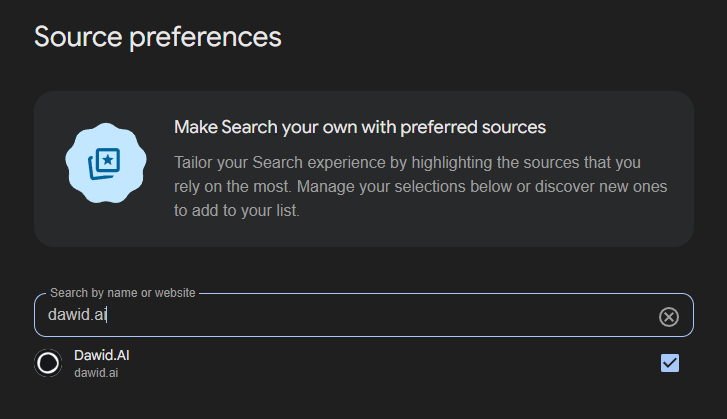
https://www.google.com/preferences/source?q=yourdomain.com
This checkbox is not selected by default, so someone still needs to click on it. I can bet the conversion rate from this is going to be suuuuper small, but better than nothing :)
It's domain-level, not per-page - Google registers whole sites, never individual URLs. So one button works everywhere on your site, and they all point at the same entry. There's nothing to configure in Search Console. The link is the integration.
Copy & Paste Button
I built a free, no-signup tool that generates the button for you:
👉 Preferred Source Button Builder
How it works:
- Type your domain.
- Pick a style - pill, solid button, promo card, text link, a floating corner widget, or a full-width ribbon.
- Tweak the color, text, and theme. The preview and code update live.
- Copy, paste anywhere in your HTML. Done.
Every snippet is self-contained - no dependencies, no tracking, no external requests. The widgets are isolated in Shadow DOM, so they won't fight with your site's CSS. Drop one next to your social buttons, in your newsletter footer, or at the end of every article.
You don't need an extension or plugin for your CMS. Just stop the HTML code and it will work. Like the one I've added to this page.


